
In the previous article, we learned about test analysis for a product in general, and now we are ready to go further and look at test analysis for specific features.
Test Analysis at the Feature Level
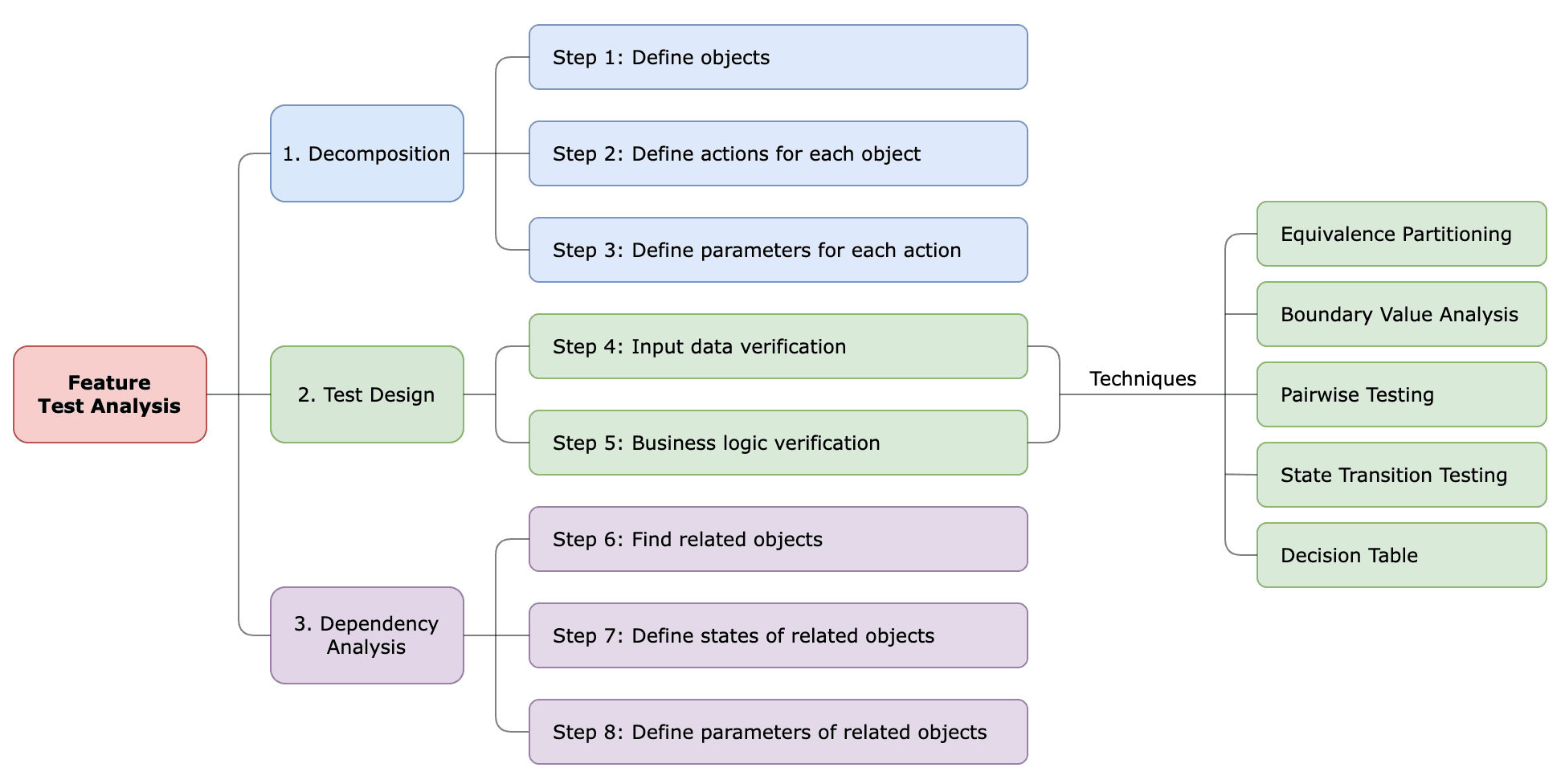
There are three main activities of test analysis at the Feature level:
- Decomposition of the tested object.
- Test Design – creating test cases using appropriate test design techniques.
- Dependency Analysis – defining relations between the tested feature and other features in the system.
Stage 1: Decomposition
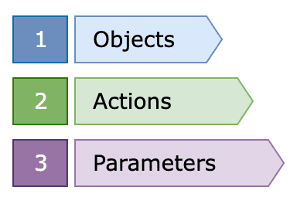
For Product test analysis, as the high-level analysis of the system, it’s enough to determine the actions of the object during decomposition, but for the Feature test analysis, we need to proceed further and define the parameters of the tested object.
Parameters are the properties or characteristics of the object, they define the specific conditions, behaviors, or configurations associated with that object. Parameters are values that act as inputs, providing specific information needed for a particular operation.
So here, we have the following sequence of decomposition:
Let’s proceed with Slack as an example and look at the Create Account feature.
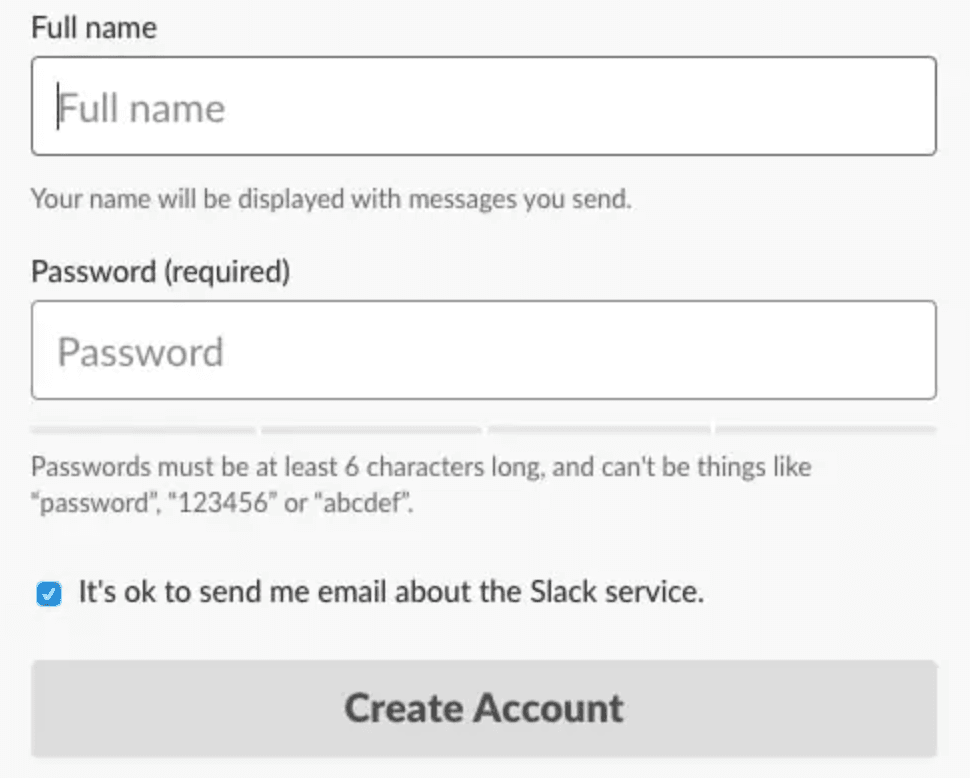
Step 1: Define the object and the action
- Object: User
- Action: Create Account
Step 2: Define the parameters of the action
To create an account, the user needs to submit a form that has the following parameters:
- Full Name
- Password
- Email Newsletter
Each parameter has requirements regarding what values it should accept:
- Full Name:
- 1 – 50 characters
- Required
- Password:
- 6 – 30 characters
- Required
- Email Newsletter:
- Yes - by default
Next, we need to create test data to check the form submission with different values for each parameter to verify that valid values are accepted and invalid values are rejected.
Step 3: Define test data for each parameter
There is a large number of possible values that can be checked and we usually don’t have so much time to test all possible values for each parameter. Instead, we can explore test design techniques that help to define an efficient set of test data.
Stage 2: Test Design
We move on to the next stage - creating test cases using appropriate test design techniques.
For testing data validation, the following techniques are most often used:
- Equivalence Partitioning
- Boundary Value Analysis
- Pairwise Testing
However, testing input validation is not all verifications that we should perform. Lots of testing that we do involves testing the business logic that sits underneath the user interface. The most known techniques that focus primarily on testing business logic functionality are:
- State Transition Testing
- Decision Tables
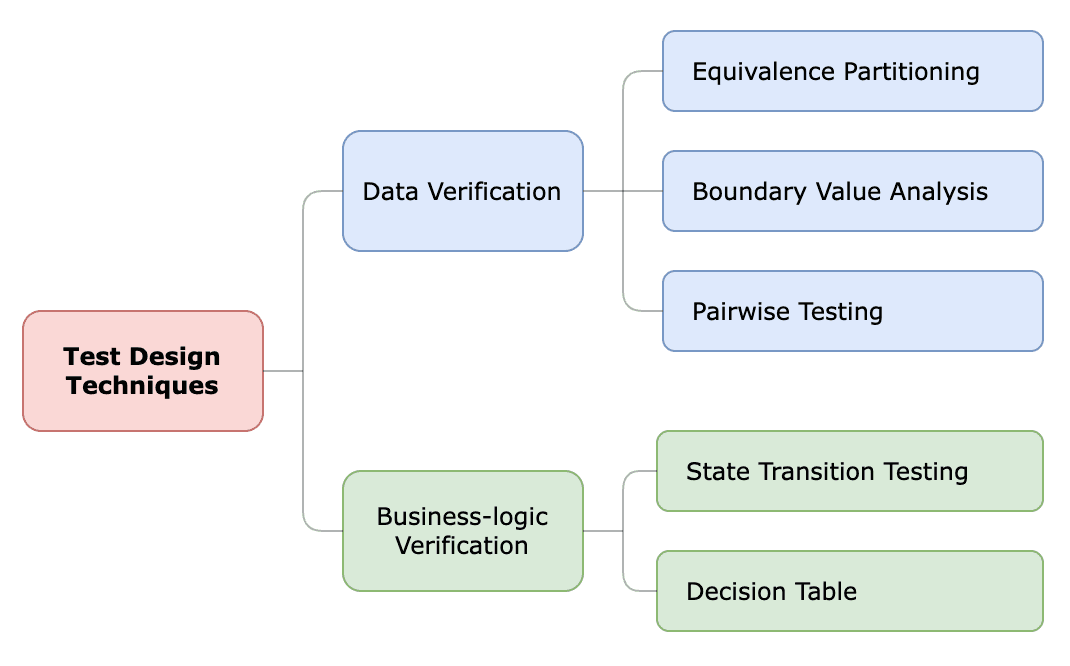
Test design techniques help reduce the number of tests while maintaining a high level of coverage. However, there are some important notes to remember about test design techniques:
- There is no one perfect technique for all situations. It is important to understand the applicability and drawbacks of each technique and be able to select the most appropriate technique or set of techniques for the testing.
- Test design efforts must be prioritized and balanced to align with the risk levels and business value.
Stage 3: Dependency Analysis
At the Feature level, we also need to conduct dependency analysis, because usually, every new feature interacts with some existing features. Hence, we need to find out these interactions and possible dependencies.
We should take the list of our objects/epics (created at the Product test analysis stage), go one by one, and think if it interacts with the feature we are testing.
Let’s perform a dependency analysis for the Send Messages feature in Slack.
Step 1: Find related objects/epics
- Channels
- we can send a message to a channel
- Users
- we can send a direct message:
- to one user
- to a group of users
- we can send a direct message:
Step 2: Define the states of the related objects
- Channels
- Active, Archived, Deleted
- Users
- Invited, Active, Deactivated
Step 3: Define the parameters of the related objects
- Channels
- Public, Private
- Users
- Regular User, Guest User, External User
Now, we can extend test cases for the Send Messages feature with the following verifications:
- Send a message to a channel:
- in different states (Active, Archived, Deleted)
- with a different type (Public, Private)
- Send a direct message to one user:
- in different states (Invited, Active, Deactivated)
- with a different type (Regular User, Guest, External User)
- Send a direct message to a group of users:
- in different states (Invited, Active, Deactivated)
- with a different type (Regular User, Guest, External User)
Let’s recap the steps of test analysis at the Feature level:
Having such a structured and comprehensive test analysis brings the following benefits:
- Ensures a deep understanding of the product.
- Defines a clear and complete scope of testing.
- Helps to achieve maximum test coverage with minimum redundancy.
- Contributes to defect prevention by identifying issues in requirements.